
Metavrse is a brand new web 3D editor software for building VR-AR scenes using only a browser. It has a lot of potential in the future because how simple it is to create scenes and import 3D models and configure. The world right now is moving to VR-AR whenever a company wants to show a product to a customer, they would use a VR-AR scene to show them in details what this product offer.
Ok great! So how does it look like?
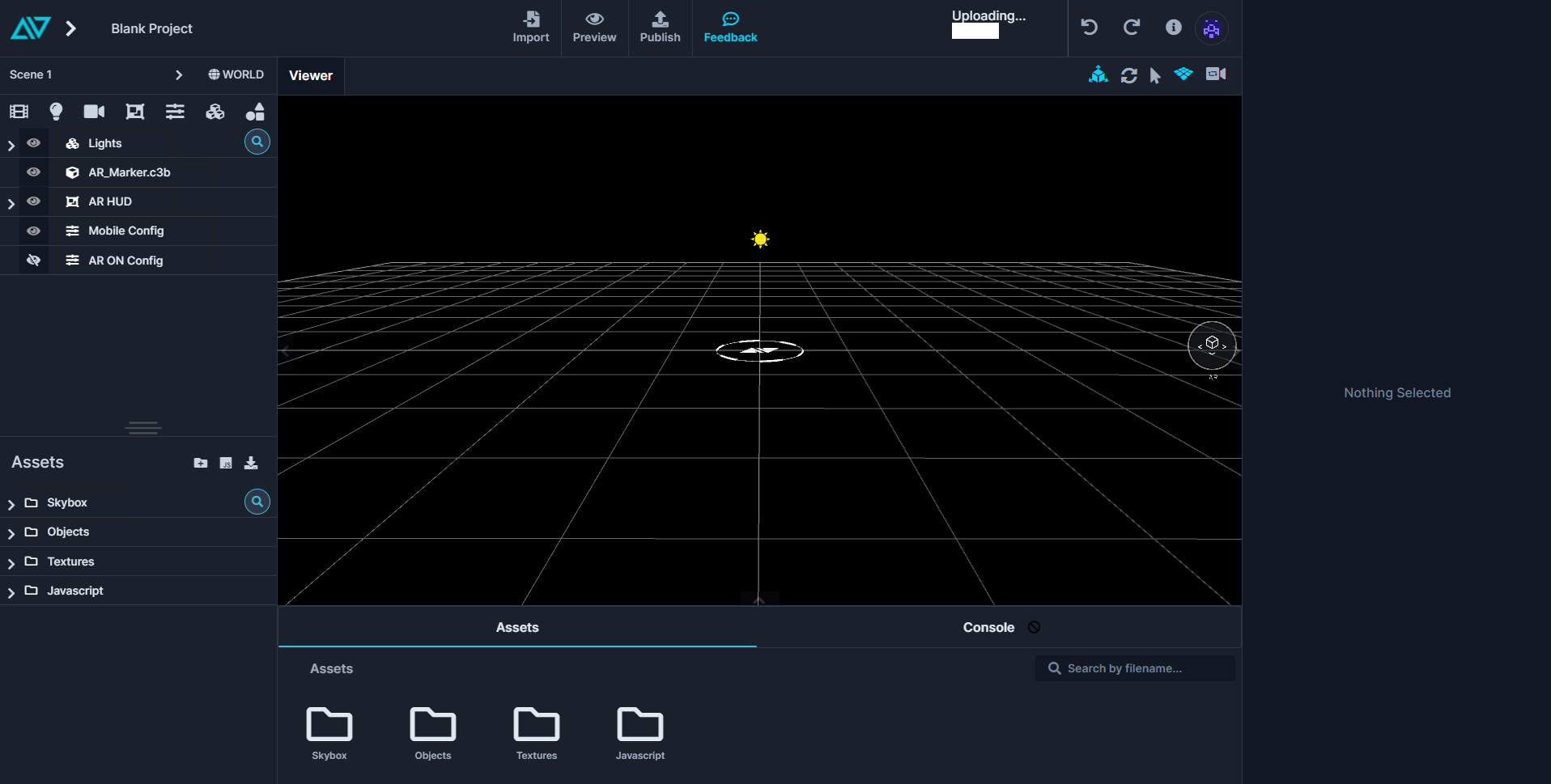
As you can see here, we have a scene and on the left is the components that are in the scene and on the right is where properties for the selected component are. If u want to import a 3D model, you just drag and drop to the scene or press the import button on top. But Metavrse only accepts couple of 3D models types. For example, FBX.
What problems have I faced ?
Whenever I started working in Metavrse, I have faced many problems Most of which I was able to solve.
Starting camera position
When you start the scene, you should choose where the camera should be. But in Metavrse this option is not available in the UI which is a bummer. After a while of searching on how to do it, it was to no avail because Metavrse has no community which was a bummer.
So how did I fix it?
It was not the best solution but it was better than nothing until the developers add it in the UI.
I had to go the controller used in the world called “AR World Controller” and checked its code by right clicking and “edit” then I searched for the world camera and I saw 2 variables for it. I then changed the parameters for it and added the coordinates where the camera should be.
const starting_camera = { distance: Module.controls.distance, target: [...Module.controls.target], position: [...Module.controls.position], } const finishing_camera = { distance: 2.6422800815384977, target: [0, 0.4844134747982025, 0], position: [0.6883364947012597, 1.3035339478476367, 2.415963275782353], }
Configurations
In Metavrse, there are configurations where it changes a state of a component in the scene whenever you press on a button or a component. You can change whatever you want with a component or group of components, like changing its size, color or adding a new one. But after you add many configurations it become too complex. Another thing to add is when you press on a component and a configuration applies you cant disable that configuration if you press on the same component again.
What is the solution then?
Best thing you can do is add you add couple lines of code to fix it but its not optimal 100%. How to do it? Its simple, go to the mega controller and edit it. Then find this snippet.
if (cfg.aftercamera == undefined || !cfg.aftercamera) node.visible = cfg.toggled;
and change it to
if (cfg.aftercamera == undefined || !cfg.aftercamera) { cfg.toggled = !cfg.toggled; node.visible = !node.visible; }
Scaling problem
Sometimes when I open the project, scaling goes off. What you can do is check the component that has a scaling problem and check its scaling numbers. Sometimes it doesn’t save correctly. Another problem with scaling was whenever you want to change scale of a component the screen goes blank and you need to reload the project to resume working. Unfortunately, there is no fix for this.
Group of Objects
You can add a couple of components (objects) in a group which sounds really great Doesn’t it? Whenever you add 2 objects in a group, sometimes the positioning goes off so you need to change position of each object separately which is time consuming. Sometimes it works a like charm, I have no idea how it works lol.
So then what are the pros and cons?
Pros
- Easy to use
- No coding required
- Cloud based, which means you can access your project and resume on the go
- Uploading project is so much easy with just a click of a button and it provides you with a link to share to customer or your friend to check the scene you have created.
Cons
- No community
- Still has many bugs
- Sometimes objects don’t get scaled properly
- Still has ways to go
- Tutorials are outdated
Conclusion
Metavrse is a great tool but has many flaws. It has a good future if they kept developing it and its community starts to grow and produce forums where people can ask and help each other. Because if there is no community there is no feedback and if there is not feedback then you can’t grow and become successful. I hope people starts learning about this software and use it and produce beautiful VR-AR scenes which we can delve into it easily.
Hello MAUI!
8/7/2021
MAUI is the next evolution of Xamarin.Forms,Which is built on 6 Or 7 years Xamarin Forms experience,What is Blazor?
8/7/2021
In this article, we will understand what Blazor is, but before that, let's first understand how web applications are developed today
Introducing FlutterFlow
8/7/2021
Building Flutter apps is now faster than ever with FlutterFlow!
Next.js, an awesome piece of technology
11/7/2021
Next.js is a react framework, which It means It’s a platform for developing single page application using react , it makes the wesite faster and high performance

Ready to raise the difficulty level?