
MAUI is the next evolution of Xamarin.Forms,Which is built on 6 Or 7 years Xamarin Forms experience, Xamarin Forms is enhanced in a way to skip or improve the flawed things that was in older editions.
If we want to work with .Net MAUI, we have to learn and work with .Net 6 Preview 2.
MAUI is the next evolution of Xamarin.Forms,Which is built on 6 Or 7 years Xamarin Forms experience, Xamarin Forms is enhanced in a way to skip or improve the flawed things that was in older editions.
Maui is a cross-platform framework that will allow us to create native user interfaces for desktop and mobile devices, and all of these could be built from a single code base with a single project. .NET 6 has been tested with Visual Studio 16.9 and Visual Studio for Mac 8.9. those are recommend for using .NET 6.
.Net MAUI Supported Platforms:
MAUI Apps can be used for the following platforms, moreover, the platform matrix has been expanded alongside with .NET 6.
The platforms are:
- Android 5.0 (API 21) or higher.
- iOS 10 or higher.
- macOS 11(Big Sur) or higher, Mac Catalyst, for x64 and Apple Silicon (M1).
- Windows Arm64 (specifically Windows Desktop).
.NET 6 Preview Installers:
If you prefer to install everything manually, you can find all of the official installer links below:
- Windows: dotnet-sdk-6.0.100-preview.5.21302.13-win-x64.exe
- macOS: dotnet-sdk-6.0.100-preview.5.21302.13-osx-x64.pkg
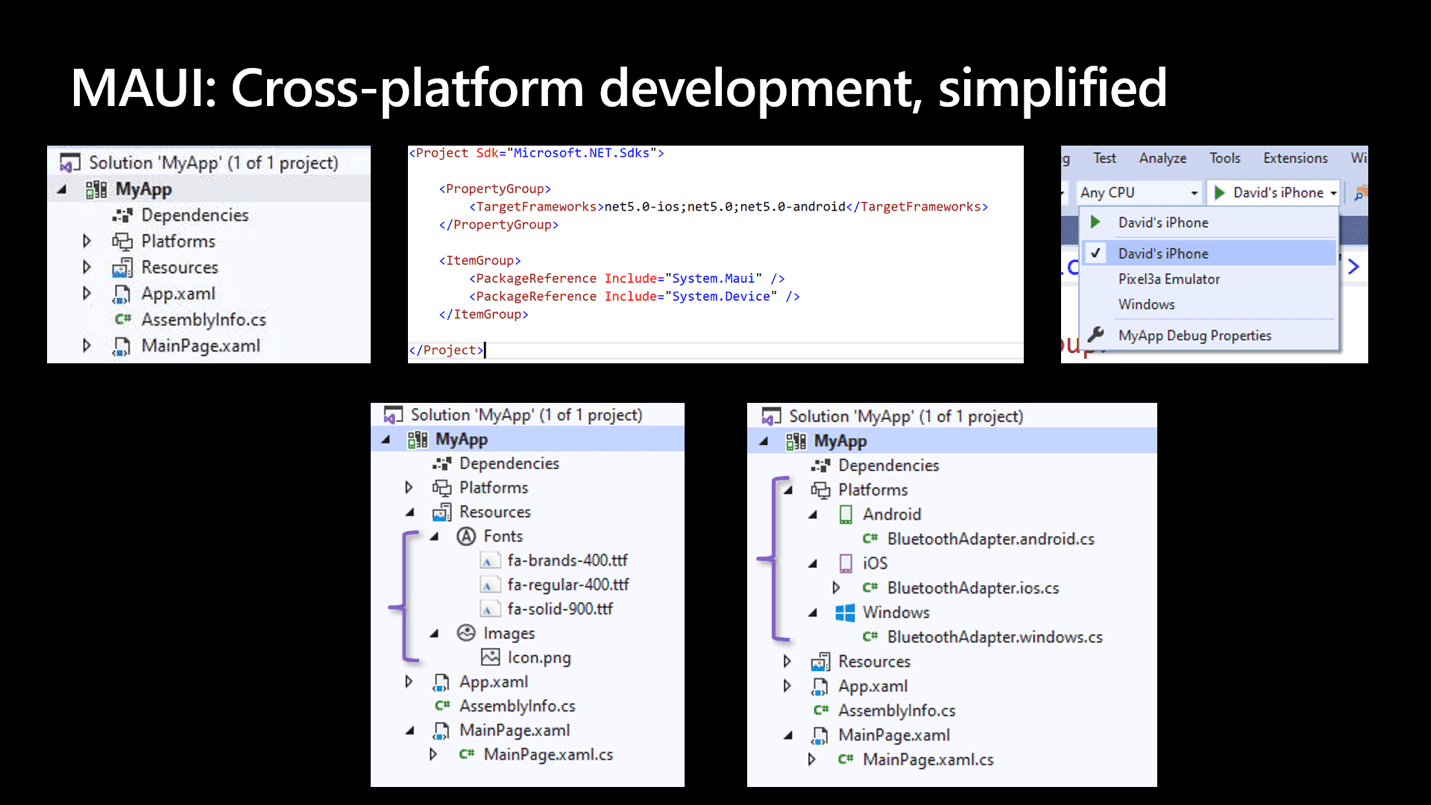
1- A single, multi-targeted application project
You can run Maui on Android , iOS , and macOS, Windows in one Project,Which has platforms and Resources Concepts.
- Inside Resources: we could find Shared fonts images, and app icons.
- .NET MAUI will enable them to natively work on all platforms you target.
You will find them in your *.csproj as SharedImage and SharedFont.
<ItemGroup>
<SharedImage Include="appicon.svg" ForegroundFile="appiconfg.svg" IsAppIcon="true" />
<SharedFont Include="ResourcesFontsionicons.ttf" />
</ItemGroup>
And both accept wildcards(All) to include all files(fonts , images, and app icons).
<ItemGroup>
<SharedImage Include="appicon.svg" ForegroundFile="appiconfg.svg" IsAppIcon="true" />
<SharedImage Include="ResourcesImages*" />
<SharedFont Include="ResourcesFonts*" />
</ItemGroup>
MAUI starts every application using the Microsoft.Extensions HostBuilder.
This provides a consistent pattern for application developers as well as library maintainers to quickly develop native applications.
Each platform has a different starting point, and the consistent point of entry for your application is Startup.cs.
Here is the most basic example:
public class Startup : IStartup {
public void Configure(IAppHostBuilder appBuilder) {
appBuilder .UseMauiApp<App>() .ConfigureFonts(fonts => { fonts.AddFont("ionicons.ttf", "IonIcons"); })
.ConfigureLifecycleEvents(lifecycle => { #if ANDROID lifecycle.AddAndroid(d => { d.OnBackPressed(activity => { System.Diagnostics.Debug.WriteLine("Back button pressed!"); }); });
#endif
});
}
}
Maui has IWindow, IPage , IMauiContext (Dependency Service, Dependency Injections) Concepts, so it can configure fonts, configure services, and register compatibility for Xamarin.Forms renderers or your own custom renderers.
This is also where you introduce your App, an implementation of Application which is responsible for (at least) creating a new Window:
public partial class App : Application{
public override IWindow CreateWindow(IActivationState activationState){
return new MainWindow();}
}
And this is example of How to Add interface to the MainWindow:
Maui works with IWindow concept, it means to support multi-windows not Single windows as Xamarin Forms, so a lot of changes happened to the interface, as Maui works with handlers and not so many renderers.
public class MainWindow : IWindow{
public MainWindow(){
Page = new MainPage();}
public IPage Page { get; set; }
public IMauiContext MauiContext { get; set; }
}
Design Patterns for MAUI:
Maui still support MVVM (Model View ViewModel) as xamarin forms.
<StackLayout>
<Label Text="Welcome to .NET MAUI!" />
<Button Text="{Binding Text}" Command="{Binding ClickCommand}" />
</StackLayout>
public Command ClickCommand { get; }
int count = 0;
void ExecuteClickCommand (){
count++;
Text = $"You clicked {count} times.";
}
beside the Elm Architecture which is known as MVU(Model View Update) Design Pattern, MVU encourages a one-way flow of data and state management, as a code-first development experience that rapidly updates the UI by applying only the changes necessary. MVU also allows us to write UI code and logic in C# here is counter example in the MVU style written in .NET MAUI.
readonly State<int> count = 0;[Body]
new Button( () => $"You clicked {count} times.", () => count.Value ++) )
};
in addition The .NET MAUI namespaces will be updated as:
- Xamarin.Forms will be replaced by System.Maui.
- Xamarin.Essentials will be replaced by System.Device.
Where can we generate MAUI projects?
- Visual Studio for Windows and macOS.
- Visual Studio Code for both Windows and macOS
- using CLI (command Line interface) you can start a project with command as shown below:
dotnet new maui
How To Run Maui Project?
1- By using terminal from The directory where the project is placed, Using this command:
dotnet build
Then Build Single Project and Run on iOS Simulator:
dotnet build HelloMaui -t:Run -f net6.0-iOS
Run on Mac System as Application:
dotnet build HelloMaui -t:Run -f net6.0-Mac Catalyst
Run on Android Emulator:
dotnet build HelloMaui -t:Run -f net6.0-android
When will MAUI be available?
As we know they need more time for updating namespaces, and for Xamarin Forms updates. But as we all know .NET MAUI has published multiple previews this year, but we have to wait until November 2021, then the release will be available.
Hello MAUI!
8/7/2021
MAUI is the next evolution of Xamarin.Forms,Which is built on 6 Or 7 years Xamarin Forms experience,What is Blazor?
8/7/2021
In this article, we will understand what Blazor is, but before that, let's first understand how web applications are developed today
Introducing FlutterFlow
8/7/2021
Building Flutter apps is now faster than ever with FlutterFlow!
Next.js, an awesome piece of technology
11/7/2021
Next.js is a react framework, which It means It’s a platform for developing single page application using react , it makes the wesite faster and high performance

Ready to raise the difficulty level?